Groovz earbudsSound without
shutting life out.
Your favorite music. The world around you. Discover open-ear listening with a wraparound design that keeps your ears unobstructed.
Open-ear design. Touch controls. Everyday listening.
Let your soundtrack in.
Keep your world close.
A closer look at Groovz earbuds, from their distinctive open-ear shape to the small details that make up your everyday listening routine.
Your music. Your world. Both.
Groovz earbuds bring an open-ear approach to everyday wireless listening. Instead of placing a silicone tip inside your ear canal, the pictured design wraps around the ear and positions the listening surface beside it. That difference is easy to see and worth understanding before you choose your next pair. The experience is about making room for your soundtrack while keeping a connection to the environment around you. It is a different priority from the sealed feeling of conventional in-ear headphones.
Think about the little moments that make up a normal day: a conversation in the kitchen, a colleague asking a question, a train announcement, or a walk through the neighborhood. An open-ear design leaves your ears physically unobstructed. That does not guarantee that you will hear every sound, and loud playback can still distract you. Keep the volume sensible, pause when attention matters, and follow local guidance around roads and shared spaces. Awareness is a listening habit as well as a product design.
This format is especially interesting if you dislike the pressure of ear tips or simply prefer not to have anything inserted into your ears. Fit and comfort remain personal, so look at the shape carefully and compare it with how you like to wear headphones. Groovz is not presented here as hearing protection or a replacement for specialist equipment. It is an alternative way to enjoy everyday audio, with a distinctive hook-shaped profile and a portable charging case.
Less in your ears. More in your day.
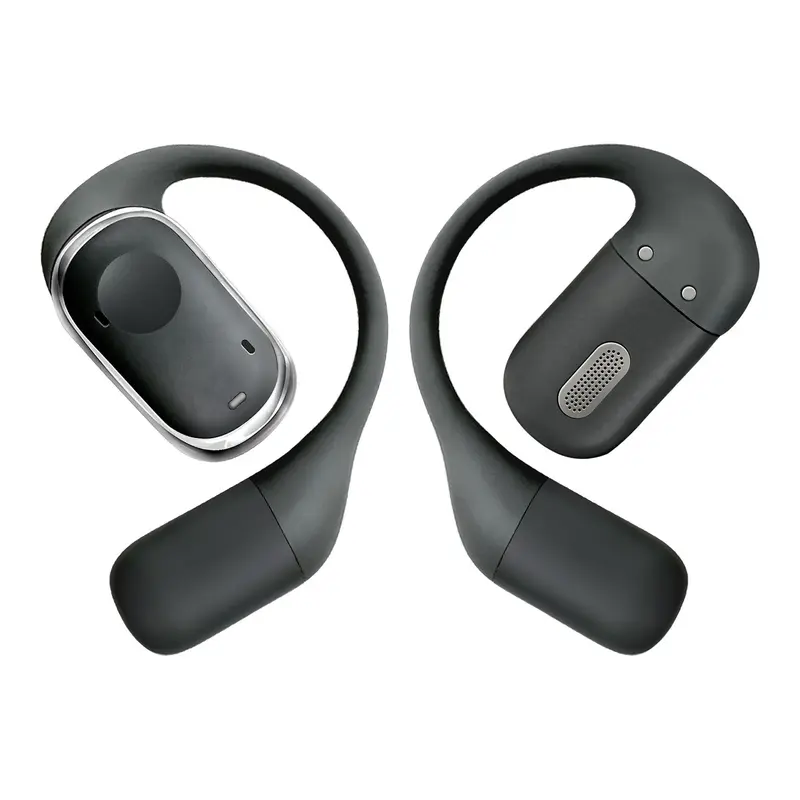
Comfort starts with the relationship between the product and your ear. The supplied Groovz photographs show a curved support that follows the outside of the ear rather than relying on a tip to stay inside the canal. The outer loop and compact listening unit form one continuous shape. That gives the earbuds a recognizable silhouette while moving the contact points away from the inside of the ear. If traditional earbuds feel intrusive, this is the design detail to pay attention to first.
Getting the placement right is more useful than forcing a fit. Identify the left and right earbuds using the markings supplied with your pair, then follow the instructions included in the package. Settle the loop around the ear gently and check that the audio unit rests in its intended position. If the fit feels awkward, remove the earbud and reposition it rather than pressing it tightly against your skin. A good listening session should not require you to ignore discomfort.
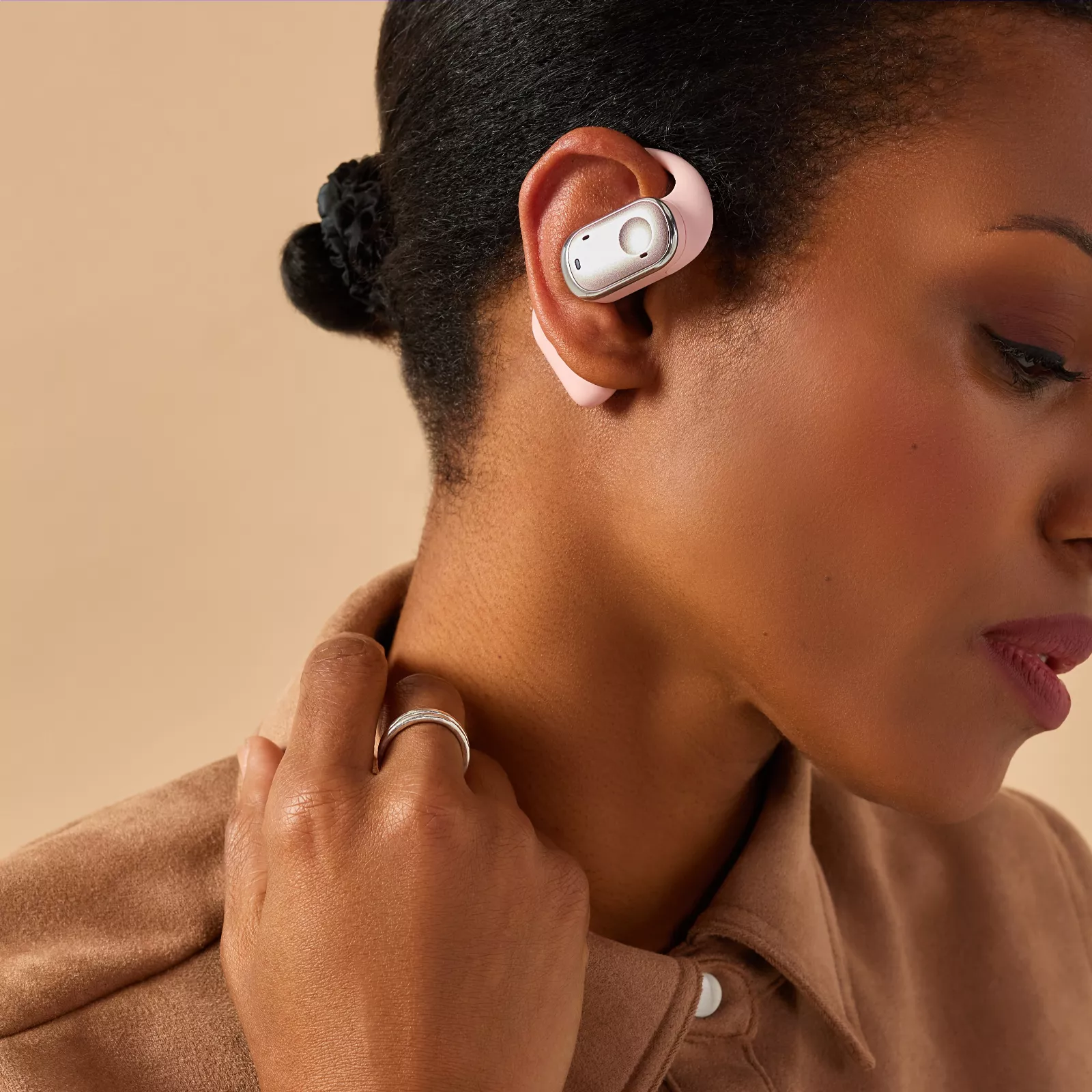
Glasses, earrings, hairstyles, and the shape of your ears can all influence how an over-ear hook feels. The lifestyle image offers a useful view of the general wearing position, but it cannot predict the fit for every person. Start with a short session and see how the earbuds feel during ordinary movement. Adjust or take a break whenever necessary. For a longer workday or a relaxed afternoon, comfort is something to check throughout the session, not a promise that any product can make universally.
Discover GroovzMake space for the sounds you love.
A favorite playlist can give an ordinary routine a different rhythm. Spoken audio can make a quiet afternoon more engaging, and a familiar album can become the backdrop to a little time for yourself. Groovz earbuds are shown as a wireless, open-ear listening option for these everyday moments. Their visible design suggests a different relationship with sound than a deeply seated ear tip. Choose the format for the way you want to listen, rather than assuming that every headphone style will produce the same experience.
Open-ear audio and sealed in-ear audio serve different preferences. Without a physical seal inside the ear canal, surrounding noise can compete with what you are playing. A calm room may be a more comfortable setting for spoken-word listening than a very noisy street. If you cannot understand your audio, moving to a quieter place is often a better choice than continually raising the volume. No claim of active noise cancellation is made on this page, and open-ear listening should not be confused with sound isolation.
For music, explore a few tracks you know well at a moderate level. For podcasts or audiobooks, check whether voices remain understandable in your usual environment. These practical checks tell you more about your own listening needs than a broad promise about perfect sound. Audio preferences are subjective, and results depend on positioning, playback level, your connected device, and the recording itself. The appeal here is the flexibility of an unobstructed ear, supported by a compact, recognizable product design.

A little touch. A lot of control.
The supplied Groovz control illustration identifies touch-based actions for music and phone calls. It shows play and pause, next and previous tracks, volume adjustments, answering and ending calls, and a voice-assistant action. These are the everyday commands that can reduce the need to take out your phone whenever your listening changes. The illustration is included below so you can inspect the features described in the supplied product material instead of relying on a list without a visual reference.
The image does not specify the exact sequence of taps for every command. Use the instructions for the model you receive to learn which earbud and which gesture perform each action. A single tap, repeated tap, and longer touch may behave differently, so do not assume that familiar gestures from another pair will carry over. Practice while seated with a low playback level. That gives you time to recognize the response without accidentally changing the volume during a conversation or while moving around.
Phone features also depend on the device and software you connect. Voice-assistant access may require the relevant assistant to be enabled, and some actions can vary between applications. If a command does not respond as expected, check the device connection and the included guide before repeating it rapidly. Touch controls are useful when they become familiar, but your phone remains an alternative for changing playback. Keep interactions simple, and pause your audio whenever the situation deserves your full attention.
Pack your soundtrack. Take it along.
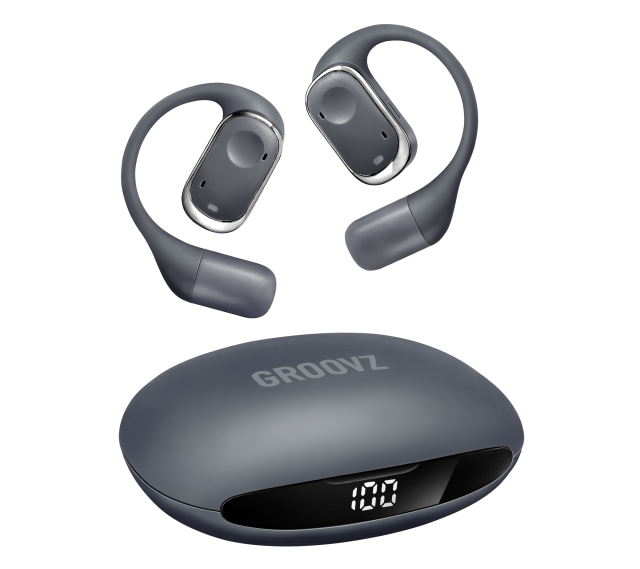
The pictured Groovz charging case brings both earbuds together in a rounded, pocket-sized form. Its charcoal finish matches the product photograph, and the front-facing digital display makes the case visually distinctive. The supplied image shows the number 100, but that is a photographed display state, not a guarantee about the charge of a delivered product. A charging case is useful as a home for your earbuds between listening sessions and as part of a simple routine for keeping them ready.
Before the first use, read the charging instructions supplied with your specific model. Confirm the compatible cable and power source rather than assuming that every wireless earbud case uses the same charging method. Keep the contacts clean and dry, and place the earbuds in their intended positions without forcing them. If charging does not begin, check their alignment and the instructions. Avoid using damaged cables or exposing the case to moisture while it is connected to power.
Real battery performance can change with playback volume, calls, device settings, and usage patterns. This page deliberately does not state a runtime or charging speed because those details should match the exact product offered by the linked seller. Check the current product listing for model-specific information before ordering. For your daily routine, the practical habit is straightforward: return the earbuds to their case when you finish, monitor the available charge using the supplied indicators, and plan charging around the listening you actually do.
Your phone. Your playlists. Your pace.
Wireless listening is most useful when it fits into the devices and applications you already use. Before ordering Groovz earbuds, check the seller’s current compatibility information against your phone, tablet, or computer. Do not assume support for a particular Bluetooth version, simultaneous connections, or a specialist audio codec from the photographs alone. Those details are model-specific. A clear match between the product listing and your device helps avoid disappointment and makes the first listening session simpler.
When your pair arrives, follow the included pairing steps in the order given. Your device will usually need wireless connectivity enabled and the earbuds in the appropriate pairing state. Choose the correct product name from the available-device list and confirm that audio plays through the earbuds. If you are setting up more than one device, consult the instructions instead of assuming the earbuds can remain connected to both at once. Keep the guide available until the connection process feels familiar.
If playback stops unexpectedly, first check the charge level, the selected audio output, and whether another device has taken over the connection. Nearby wireless activity and physical obstacles can affect performance, so test again close to your device. Restarting a connection may be enough, but resetting the earbuds should follow the specific instructions. Whether you prefer music, podcasts, or calls, thoughtful setup is the foundation of a reliable everyday routine. Your connected application still controls its own content and playback options.
From the first track to the last task.
There is no single right place for a personal soundtrack. At home, an open-ear format may suit light chores, an afternoon playlist, or listening while taking a break. At a desk, it may appeal to someone who prefers not to seal off their ears while working. The important distinction is that physically open ears do not remove distraction. Choose content and playback levels that fit the task, and take the earbuds off when a conversation or responsibility needs undivided attention.
For a walk, consider the route and the conditions before starting playback. Traffic, crossings, bicycles, and local rules all matter more than a playlist. Keep the volume low enough for the setting and pause when necessary. Groovz earbuds are not safety equipment, and no headphone can guarantee awareness of a hazard. If you use them during gentle movement, check the fit beforehand and avoid adjusting them when you need your hands or attention for something else.
At the end of the day, a small listening ritual can be enough: choose an album, settle the earbuds comfortably, and give yourself a little space. You do not need to turn every moment into background audio. Regular breaks help you notice how your ears feel and whether the volume has crept upward. The most useful pair of earbuds is the one that suits your habits without getting in the way of them. Use the product photographs and current seller information to decide whether this format matches yours.
Small habits. A better daily routine.
A little care makes any personal listening product easier to live with. Handle your Groovz earbuds with clean, dry hands, and inspect them before returning them to the case. Follow the manufacturer’s cleaning guidance for the materials and openings on your specific model. A soft cloth may be appropriate for exterior surfaces, but do not introduce liquids, sharp objects, or cleaning products without checking the instructions. Avoid pressing debris deeper into an opening or scraping the listening surface.
The supplied photographs do not establish a water-resistance rating. Check the current seller listing and the included documentation before exposing the earbuds to sweat, rain, or splashes. Even when a model has a stated resistance rating, its charging case may have different limitations. Keep charging equipment dry and do not treat water resistance as permission to swim or shower with a product. If an earbud gets wet, follow the manufacturer’s advice before charging or using it again.
Store the case where it will not be crushed by heavy items or left in extreme heat. When traveling, keep the earbuds together so they are easier to find and less likely to become separated. If you plan not to use them for an extended period, consult the storage and battery guidance that comes with the product. These habits are not complicated, but they support a tidier experience: a known place for your pair, a clean listening surface, and a charging routine that fits your day.
The right fit starts with the right details.
Choosing Groovz earbuds starts with deciding whether an open-ear hook design matches your preferences. Look at the front and rear product view to understand the shape, then use the lifestyle photograph to see the general wearing position. If you prefer a tightly sealed listening experience, an open-ear format may not be the right match. If you dislike inserting ear tips and value a less enclosed feel, it is a format worth considering. Neither preference is wrong; they simply lead to different choices.
The linked Groovz website is the destination for ordering and checking current product information. Review the exact model, available finish, package contents, device compatibility, charging requirements, and any stated performance specifications before completing a purchase. Product images may show a different finish from the option you select. The charcoal product and pink lifestyle images on this page help illustrate the design, but they do not establish which colors are currently available from the seller.
Also read the seller’s delivery, return, warranty, and support terms. This informational page does not process orders, take payments, or define those policies. Every order link takes you to the same external website, where you can review the current offer and make your own decision. No price comparison or promotional countdown is included here. The goal is a clear view of the product format, a useful explanation of everyday considerations, and a direct next step when you are ready to explore the seller’s listing.
A few things
you might be wondering.
Clear answers about the design, everyday use, and what to check before choosing your pair.
What are Groovz earbuds?
Groovz earbuds are shown here as wireless earbuds with an open-ear, wraparound design and a matching charging case. The supplied images show the listening units positioned outside the ear canal, a digital display on the case, and a touch-control illustration. Check the linked seller’s listing for the exact model and its current specifications.
How is open-ear listening different from in-ear listening?
An open-ear design does not use a tip to seal the ear canal. That can appeal to people who prefer a less enclosed feel, but surrounding sound may compete with playback. It is not equivalent to active noise cancellation or hearing protection. Volume, positioning, and the environment still affect what you hear.
What do the touch controls do?
The supplied control image lists play and pause, track changes, volume adjustment, answering and ending calls, and voice-assistant access. It does not show a complete tap sequence. Use the instructions for your particular pair to learn the gestures, and check your device settings for assistant and application compatibility.
Can I wear Groovz earbuds with glasses?
The outside-of-ear hook may share space with the arms of your glasses. The result depends on your ears, frames, and the product fit. Check the wearing position, place the earbuds gently, and begin with a short session. If you experience pressure or discomfort, reposition them or stop using them.
How long does the battery last?
Battery runtime should be checked against the exact model on the linked seller’s page. This page does not publish an unverified runtime. Playback volume, calls, and other usage conditions can change battery performance. The photographed number on the case is an image detail, not a promise of charge on delivery.
Are Groovz earbuds waterproof?
Do not assume a water-resistance rating from the images. Consult the seller’s current specifications and the documentation included with your model. Earbuds and cases may have different limitations. Keep charging contacts dry, and do not use the product for swimming or showering unless the manufacturer explicitly permits that use.
Where can I order Groovz earbuds?
Every order button on this page links to en-groovz-audio.com. That external website handles the product offer and checkout. Before ordering, review the model, selected finish, delivery details, return conditions, and warranty information there. This page provides product information and does not collect payment or manage your order.
Find your everyday groove.
Get to know a different way to listen. Explore Groovz earbuds today.